The Best Vision Board App for 2027 (Honest Comparison)
By the Reel Vision Board team · Research checked 29 October 2026
Every January, millions of people make a vision board. By March most of them have stopped looking at it. The best vision board app for 2027 is the one you'll still open in October, and for most people that comes down to one thing: whether the board actually looks like your life.
Disclosure: we make Reel Vision Board. We've tried to be fair. Every claim about another app comes from its public App Store listing or reviews on 29 October 2026, and each one is linked. This is desk research, not a hands-on test.
The short answer
- Best if you want to see yourself living it: Reel Vision Board. It was the only app we found, of 22 checked, that puts you in both photoreal AI images and AI video.
- Best free start: Reel Vision Board. You get 10 AI images, one video and unlimited text cards, with no sign-up and no trial to cancel.
- Best traditional photo-and-affirmation app: Vision Board ++.
- Best all-in-one wellbeing routine: Perfectly Happy (trial, then subscription).
- Best if you want no screen at all: a paper board. You can still print AI images of yourself for it.
What a vision board app needs to do in 2027
A vision board works by making a future feel familiar. You look at it, you feel it, and you act like someone who's already on the way. So we judged apps on what makes that happen:
- Is it you? A stranger's beach house is a goal. A photo of you on that terrace is a memory you haven't made yet.
- Will you actually see it? Widgets, your Lock Screen and a reel you can watch in a minute all beat a board buried in an app.
- Does it move? Video and motion hold attention in a way a static grid doesn't.
- Can you start free? Can you make something real before you pay?
- Is the price fair? Weekly subscriptions add up quickly.
Feature comparison
The six best-known vision board apps, the main AI rival and a paper board, side by side.
| Feature | Reel Vision Board | Vision Board ++ | Perfectly Happy | Goal Tracker | Vision Board 2027 | Vizzy | BecomeX | Paper board |
|---|---|---|---|---|---|---|---|---|
| AI images with you in them1 | Yes, advertised | Not advertised | Not advertised | Not advertised | Not advertised | Not advertised | Yes, advertised | Not advertised |
| AI video with you in it2 | Yes, advertised | Not advertised | Not advertised | Not advertised | Not advertised | Not advertised | Not advertised | Not advertised |
| Generates AI images at all | Yes, advertised | Not advertised | Not advertised | Not advertised | Not advertised | Not advertised | Yes, advertised | Not advertised |
| Board slideshow or movie3 | Yes, advertised | Yes, advertised | Yes, advertised | Not advertised | Not advertised | Not advertised | Not advertised | Not advertised |
| Home and Lock Screen widgets | Yes, advertised | Yes, advertised | Yes, advertised | Yes, advertised | Yes, advertised | Yes, advertised | Couldn't check | Not advertised |
| Make something free, no trial4 | Yes, advertised | Yes, advertised | Not advertised | Yes, advertised | Yes, advertised | Yes, advertised | Not advertised | Yes, advertised |
| Viewing target from your Screen Time5 | Yes, advertised | Not advertised | Not advertised | Not advertised | Not advertised | Not advertised | Not advertised | Not advertised |
| Works without a screen6 | Yes, advertised | Not advertised | Not advertised | Not advertised | Not advertised | Not advertised | Not advertised | Yes, advertised |
✓ advertised on the listing · ✕ not advertised · – couldn't check. Checked 29 October 2026. Some features need a paid plan.
- New scenes generated from your photos. Adding an existing selfie to a board doesn't count. BecomeX uses one photo, and you browse a feed it generates rather than describing your own scenes.
- Motion generated inside the scene. A slideshow of still photos doesn't count.
- Reel: looping reels with text cards. Vision Board ++: Magic Movies. Perfectly Happy: board videos. All three can add music.
- Without starting a trial. Free limits come from the listings and repeated reviews: Vision Board ++, Goal Tracker and Vision Board 2027 allow one board, and Vizzy allows three.
- Reel's Focus tab suggests spending 5% of your scrolling time with your own vision. Six hours of scrolling means an 18-minute target.
- Print your AI images of you and pin them on a paper board. Reels and videos stay on your phone.
Price comparison (UK)
| App | Free, without a trial | Weekly | Monthly | Yearly |
|---|---|---|---|---|
| Reel Vision Board | 10 AI images, 1 video, unlimited text cards | – | £9.99 | £59.99 |
| Vision Board ++ | 1 board | – | £3.99 | £17.99 |
| Perfectly Happy | Trial only | – | £9.99 | £59.99 |
| Goal Tracker | 1 board | £6.99 | – | £19.99 |
| Vision Board 2027 | 1 board | – | £5.49 | £24.99 |
| Vizzy | 3 boards | – | – | – |
| BecomeX | Trial only | £6.99 | – | £34.99 |
Lowest listed UK App Store price per period, checked 29 October 2026. "–" means no such plan is listed. Several apps list more than one price per period; we show the lowest. Vizzy lists Premium and All Access tiers from $7.99 to $39.99 (US) without saying which period each one covers. Goal Tracker and Vision Board 2027 also sell lifetime unlocks (£49.99 and £34.99). Prices change, so check the in-app price before you buy.
Reel's yearly plan includes 600 credits up front, about 120 AI images at 5 credits each, which works out at roughly 50p an image. The other apps don't sell image generation, so for them you're paying for layouts, libraries and affirmations, not new pictures of you.
The established apps, briefly
These are the apps with the most ratings, so most people will try them first. They're all good at the classic job of arranging photos and words, but none of them generates images.
Vision Board ++ Maker Manifest
4.9★ from 3,000+ US ratings
The best-reviewed traditional app. You build a board from your own photos and a big Unsplash library, and Magic Movies turn it into a slideshow with music and spoken affirmations. Widgets, iCloud sync and 26 languages. Its AI writes affirmation text, not images. One board is free; reviewers repeatedly mention that limit.
Vision Board Perfectly Happy
4.8★ from 4,600+ US ratings
A full wellbeing routine: 6,000+ affirmations, a mood tracker, a gratitude journal and board videos made from your photos. It's polished and popular, but reviewers say there is no free version beyond the trial, and some find the tile layout rigid.
Vision Board & Goal Tracker
4.7★ from 3,700+ US ratings
Simple boards plus an affirmation maker and widgets. The free tier is one board with only a couple of photos, and the weekly plan is £6.99. Recent reviews after the 3.0 update (September 2026) mention a crop bug and a broken affirmations section.
Vision Board 2027
4.6★ from 2,700+ US ratings
A Feng Shui Bagua layout, Face ID lock and Unsplash images. It renames itself every year, which is why it ranks for "2027". Its own listing says it needs an active subscription for core features; long-time users in the reviews miss the old free version.
2027 Vision Board Maker Vizzy
4.4★ from 600+ US ratings
Another yearly rename. It offers three free boards, more than most, but recent one-star reviews describe image search that won't load and paywall prompts on every limited action.
The AI vision board apps
A newer group of apps generates images for you. Most of them, including VisionBoard_AI, VizBo, Veezy and Dremai, generate generic scenes from a text prompt. Only three, besides us, advertise putting you in the image: BecomeX, AI Vision Board – Dream Maker and Lucky Girl. None of them advertises video of you.
BecomeX is the best known, with 150+ US ratings. It needs a subscription after a 3-day trial (£6.99 a week or £34.99 a year), and you browse a feed of boards it generates rather than describing your own scenes. Getting your likeness right is hard, and some of its reviewers say so:
"After uploading my photo, the person that somehow was supposed to be me, looked nothing like me." 2★ App Store review, US, 9 August 2025
"The few pictures that did feature my face were great, however, I only got about three of those." 3★ App Store review, US, 25 July 2025
These reviews pre-date BecomeX's latest update (August 2026), so things may have improved.
Reel Vision Board: what's different
1. You're in every picture, and every video
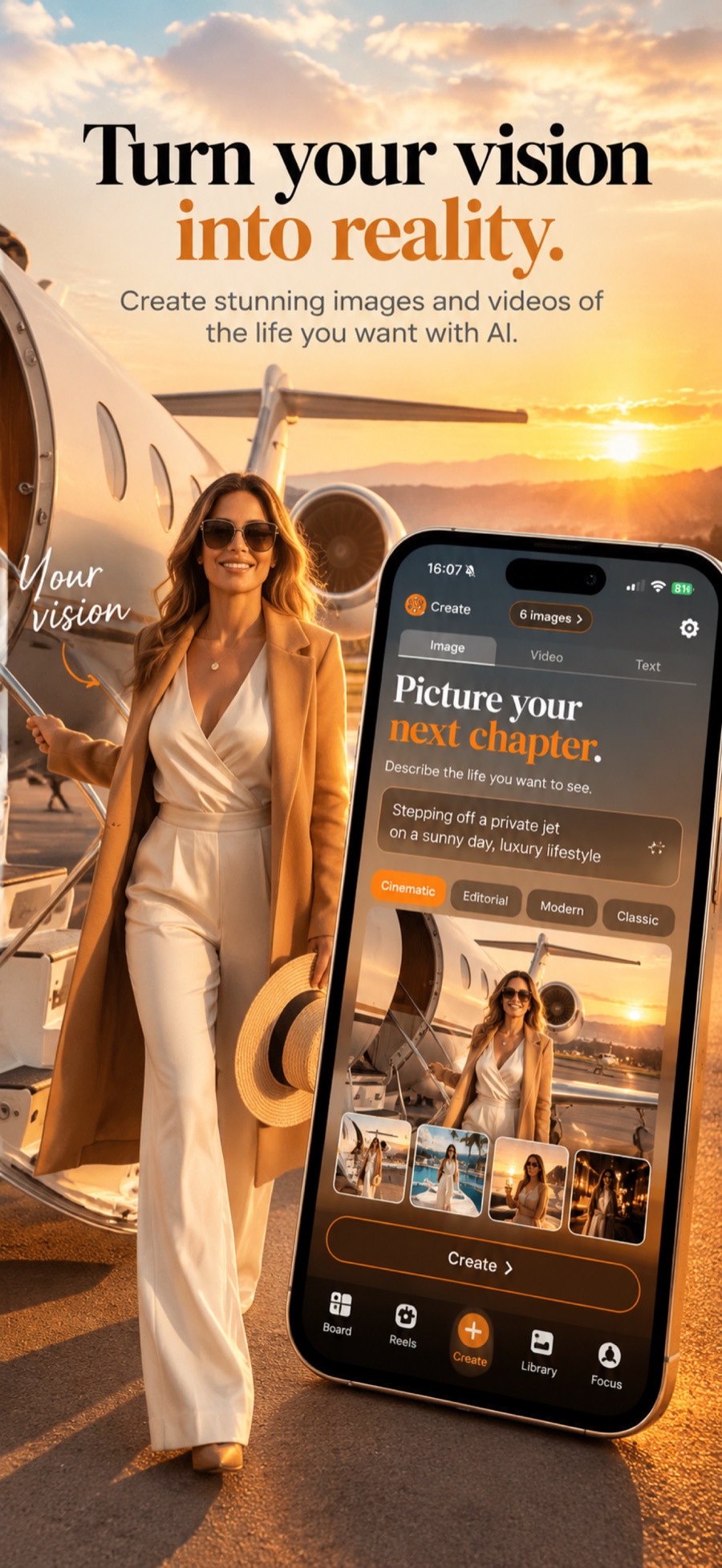
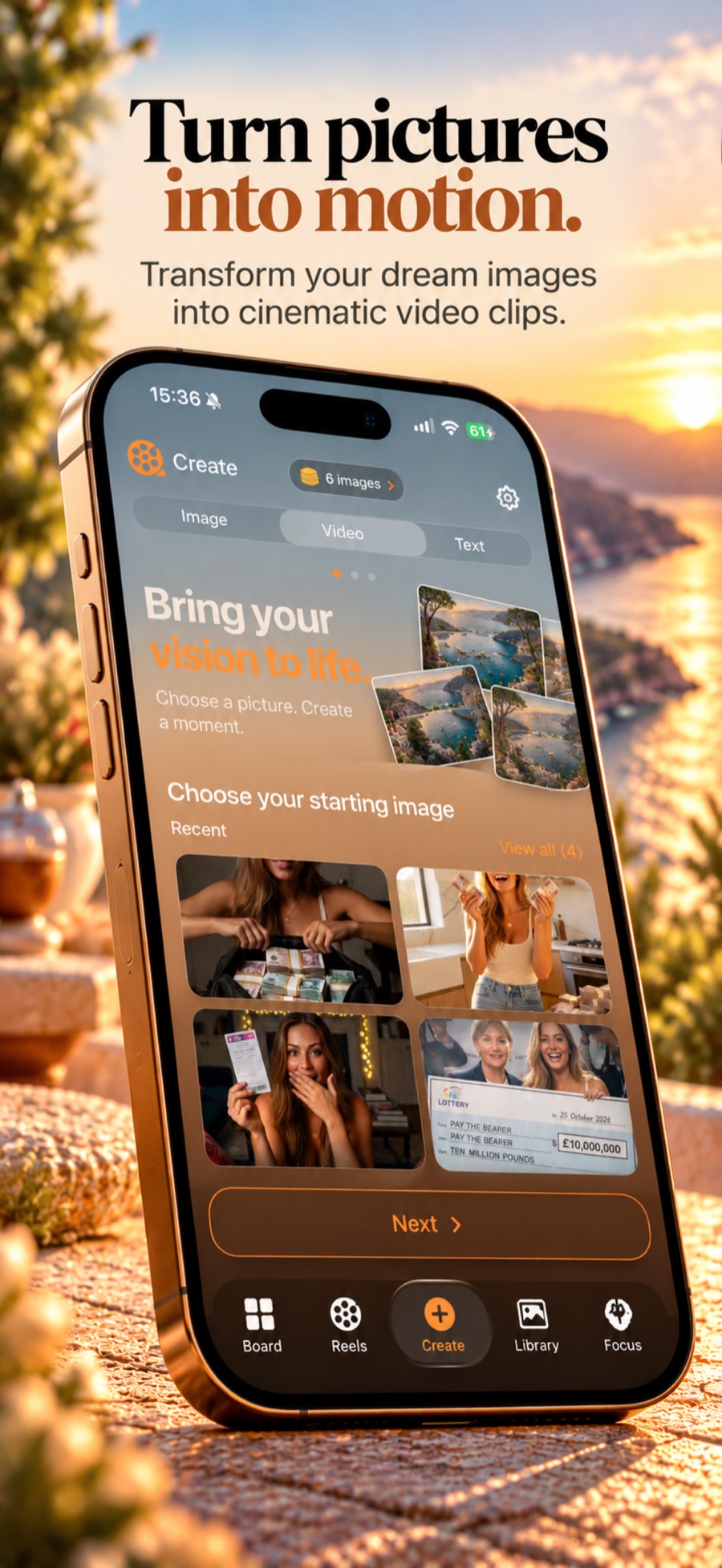
Add two photos once, a selfie and a full-length shot. After that, describe a scene, such as "me signing the keys to a house by the sea", and Reel generates a photoreal image of you there. Then turn any image into a short video with motion and sound. Your face is remembered across images and video, so your whole board looks like one life.
2. Genuinely free to start
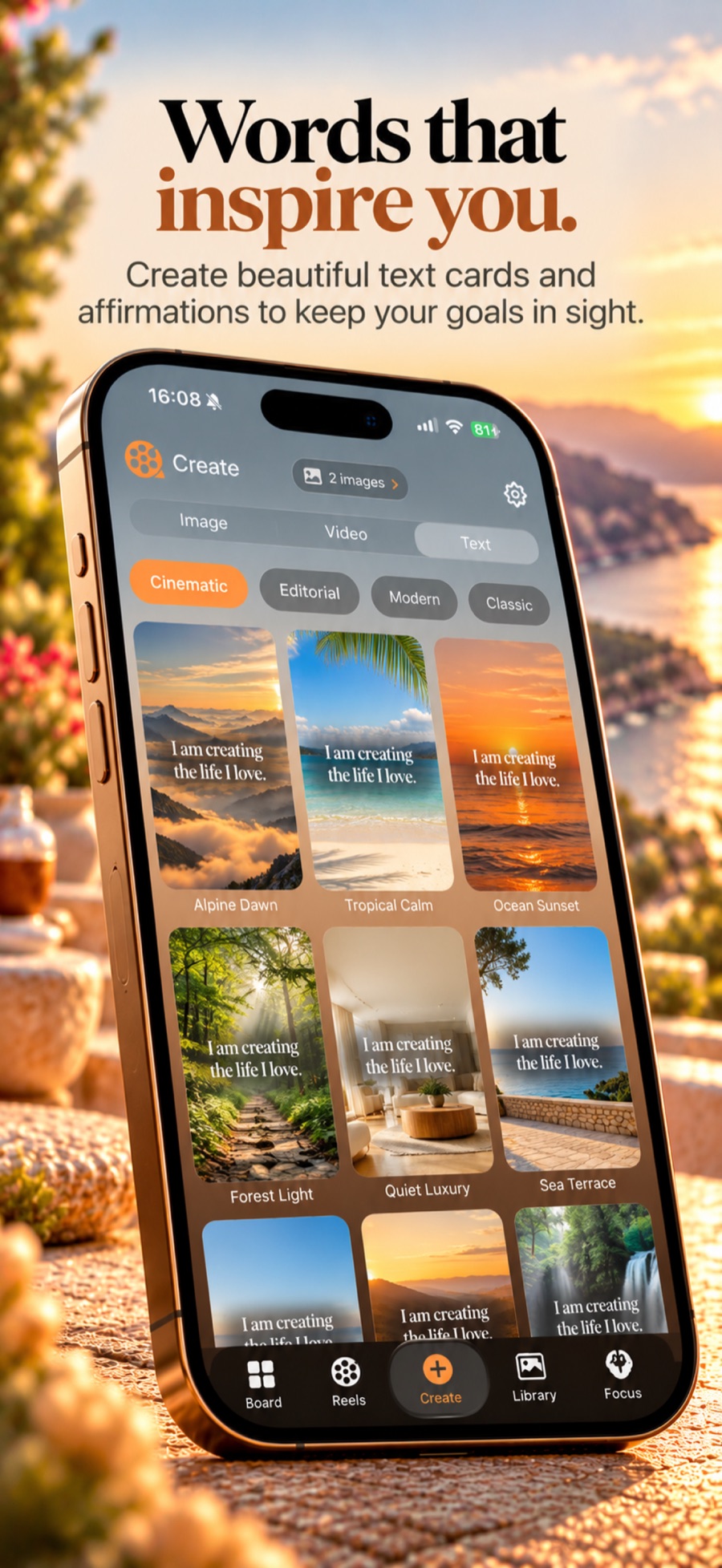
Free gets you 10 AI images, one video and unlimited text and affirmation cards, boards and reels. There's no sign-up and no trial to cancel. In practice that's two or three boards and two or three reels, mixing AI images of you with affirmation cards, for £0.
3. Reels, not just boards
Turn a board into a looping reel with text cards and gentle zoom or fade, made to watch in a minute and to share to Instagram, TikTok or Stories.
4. No blank page
Not sure what to put on it? Spin Inspire Me for a ready-made vision, such as wealth, travel, health or love, and get images of you living it.
5. It keeps your vision in front of you
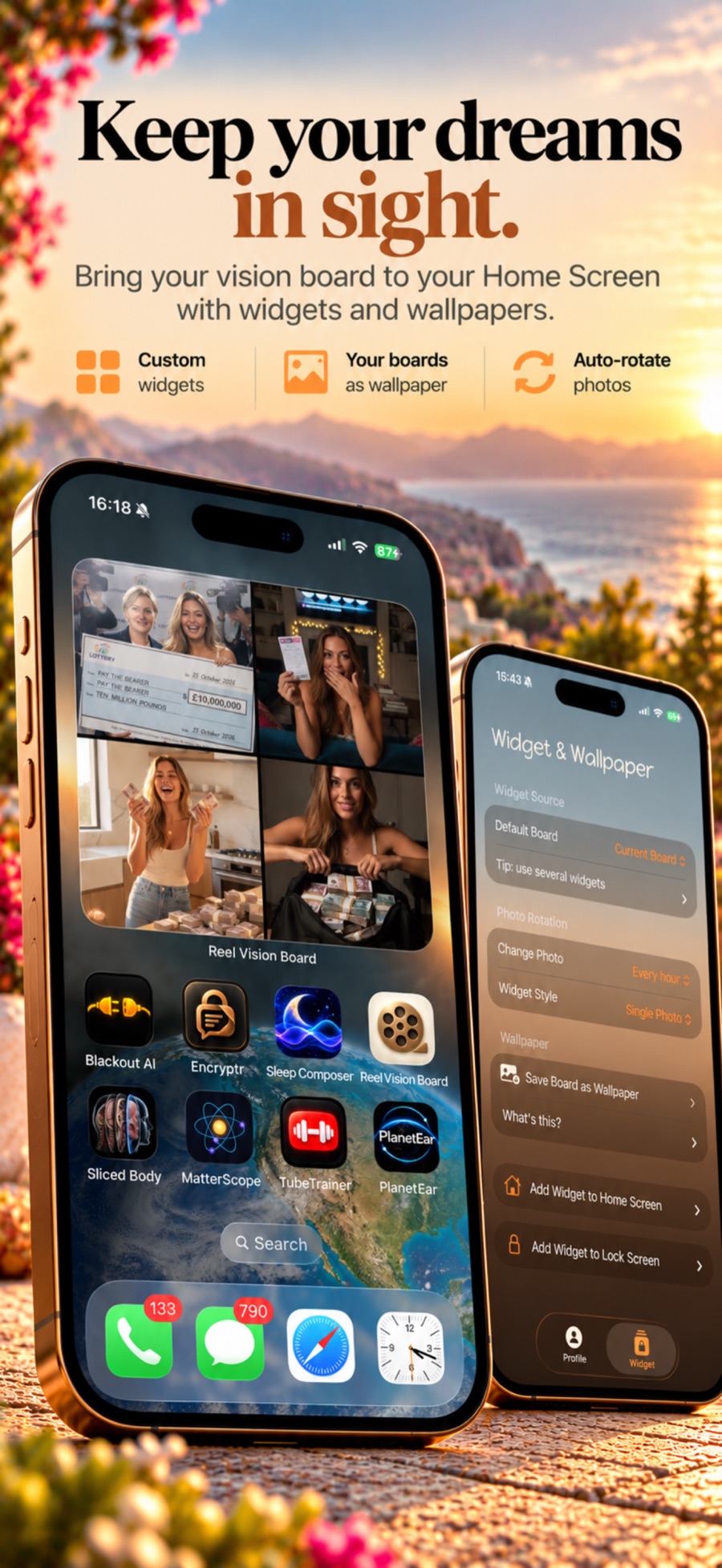
Home Screen and Lock Screen widgets give you a mini vision board you'll see a hundred times a day, and each widget can show a different board or reel. There's wallpaper export and a journal. The Focus tab reads your Screen Time and suggests giving 5% of your scrolling time back to your own vision. After six hours of scrolling, that's 18 minutes with your reels.
6. Print it, too
Love paper boards? Save your AI images to Photos and print them. A photo of you in your future, on your wall, is something a magazine collage can't give you.
Pro, if you want more
Pro Annual is £59.99 a year and includes 600 credits up front, about 120 images, or a mix of images and HD video. That's about £5 a month, half the price of 12 monthly payments. Pro Monthly is £9.99 for 50 credits a month. We recommend Annual for one reason: you'll do most of your creating in the first few weeks of the year while the ideas are fresh, then spend the rest of the year watching your board and acting on it. See full pricing.
Being honest: we're new, so we have no App Store ratings yet, and AI likeness isn't perfect every time. Make a few, keep the ones that feel like you.
When another option suits you better
- You want a guided routine with thousands of affirmations, a mood tracker and a journal: Perfectly Happy.
- You only want to arrange your own photos, with a slideshow: Vision Board ++.
- You want a Feng Shui Bagua layout: Vision Board 2027.
- You want to make it by hand and keep it away from screens: a paper board.
Coming to Reel Vision Board in 2027
These are plans, not features you can use today, and timing may change.
- iPad and picture-frame mode. Turn the old iPad in your drawer into a digital vision board on your wall or desk that cycles through your boards and reels all day. Today Reel is an iPhone app.
- Put yourself in any photo. Add a second reference image of a place, such as that office, that house or that stage, and Reel puts you in it.
- More languages. Spanish, French, Italian, German and Brazilian Portuguese.
Make your 2027 vision board this week
- Pick three to five areas: money, work, home, health, love or travel.
- For each one, write the scene in one sentence, in the present tense, with you in it.
- Generate an image of each scene, and keep only the ones that give you a jolt of feeling.
- Add an affirmation card to each image and turn the board into a reel.
- Put it on your Lock Screen, watch the reel daily, and take one small action it points to.
More detail: how to make a vision board that actually works.
Your 2027, with you in it
Make your first AI images and a reel of you living your goals, free, in a few minutes. No sign-up, no trial to cancel.
Start free — no sign-up neededNo credit card required.
Frequently asked questions
What is the best vision board app for 2027? +
It depends on what you want the board to do. If you want to see yourself living your goals, Reel Vision Board was the only app we found (of 22 checked on 29 October 2026) that puts you in both photoreal AI images and AI video. If you want a photo-and-affirmation slideshow from your own pictures, Vision Board ++ is the best-reviewed traditional app.
Is there a free vision board app? +
Most vision board apps are free to download but limit you to one board or a short trial. Reel Vision Board's free tier includes 10 AI images, one AI video and unlimited text cards, boards and reels, with no sign-up and no trial to cancel. That's enough for two or three boards and reels without paying anything.
Can an app put my face on my vision board? +
Yes. Reel Vision Board asks for two photos once, then generates new photoreal scenes of you, such as at your dream home, on stage or travelling, and can turn them into short videos. BecomeX, AI Vision Board – Dream Maker and Lucky Girl also advertise AI images of you, but none of them advertises video.
Do I need to sign up? +
Not to start. You can create with Reel Vision Board straight away. When you want to keep your work safe or move to a new phone, sign in with Apple or email and everything restores. You don't need Pro to do that.
Does Reel Vision Board work on iPad? +
Today it is an iPhone app. A dedicated iPad version, including a picture-frame display mode for a spare iPad, is planned for 2027.
Can I share my vision board to Instagram or TikTok? +
Yes. You can share images, boards and looping reels to social media or save them to Photos, and you can print still images for a paper board too.
Is a digital vision board better than a physical one? +
What matters most is how often you actually look at it. A paper board is lovely to make, but it is easy to stop seeing. A phone board sits where your attention already goes, on your home screen and lock screen and in a reel you can watch in a minute. You can also do both: print your favourite AI images for the wall.
How we researched this: we searched the UK and US App Stores for "vision board" and "AI vision board" on 29 October 2026. We read the full listing, the in-app purchase list and the most recent customer reviews for the 22 relevant apps, and we left out of the comparison any app with no update since 2023. We installed nothing, so the listings and reviews are our only sources. If we've got something wrong about your app, tell us and we'll correct it.
Keep reading
Why the Law of Attraction Isn't Working for You
The 7 real reasons your manifesting has stalled — and how to fix each one.
How to Manifest (Properly) When It's Not Working
The step-by-step method most people skip, including the 369 technique.
How to Make a Vision Board That Actually Works
Why a static collage doesn't deliver, and what to do instead.